
We’re pleased to announce the release of AODocs 69 in June 2026.
Launch details
Rollout pace: From June 2nd to June 3rd, 2026.
As usual, this release requires no installation or manual update on your devices. The new version rolls out automatically when you connect to the platform. It can take up to 72 hours to become available on your specific domain.
What’s new in AODocs 69
AODocs 69 introduces major enhancements designed to expand engineering document control for Capital Projects, streamline document capture with AI-powered splitting, boost end-user productivity with enhanced views, and deliver advanced tenant governance tools.
The main highlights are:
- Capital Projects natively in AODocs: Visualize 2D/3D design files, compare drawing revisions, automate contractor comment cycles, and handle DWG external references (XREFs) directly in AODocs.
- Intelligent document capture and scheduling: Automatically split batch files with AI-powered document splitting, and configure working calendars to automatically calculate business-day due dates.
- Enhanced user interface active by default: Use new views with faster load times and the document preview side panel, now active by default across all customer domains.
- Enterprise-grade governance and integrations: Control workflow responsibilities with time-bound task delegations, deploy tenant-wide notification banners, and leverage Microsoft SharePoint Embedded as a native storage platform.
Explore the details below to find out how these updates can improve productivity, automation, and governance across your AODocs environment.
Capital Projects & Engineering Document Control
Autodesk Viewer: Preview 2D and 3D Design Files Natively
You can now view, rotate, and measure 2D and 3D design files directly within the AODocs interface alongside document metadata, workflows, and approval history. This integration eliminates the need for separate desktop applications or downloading large files.
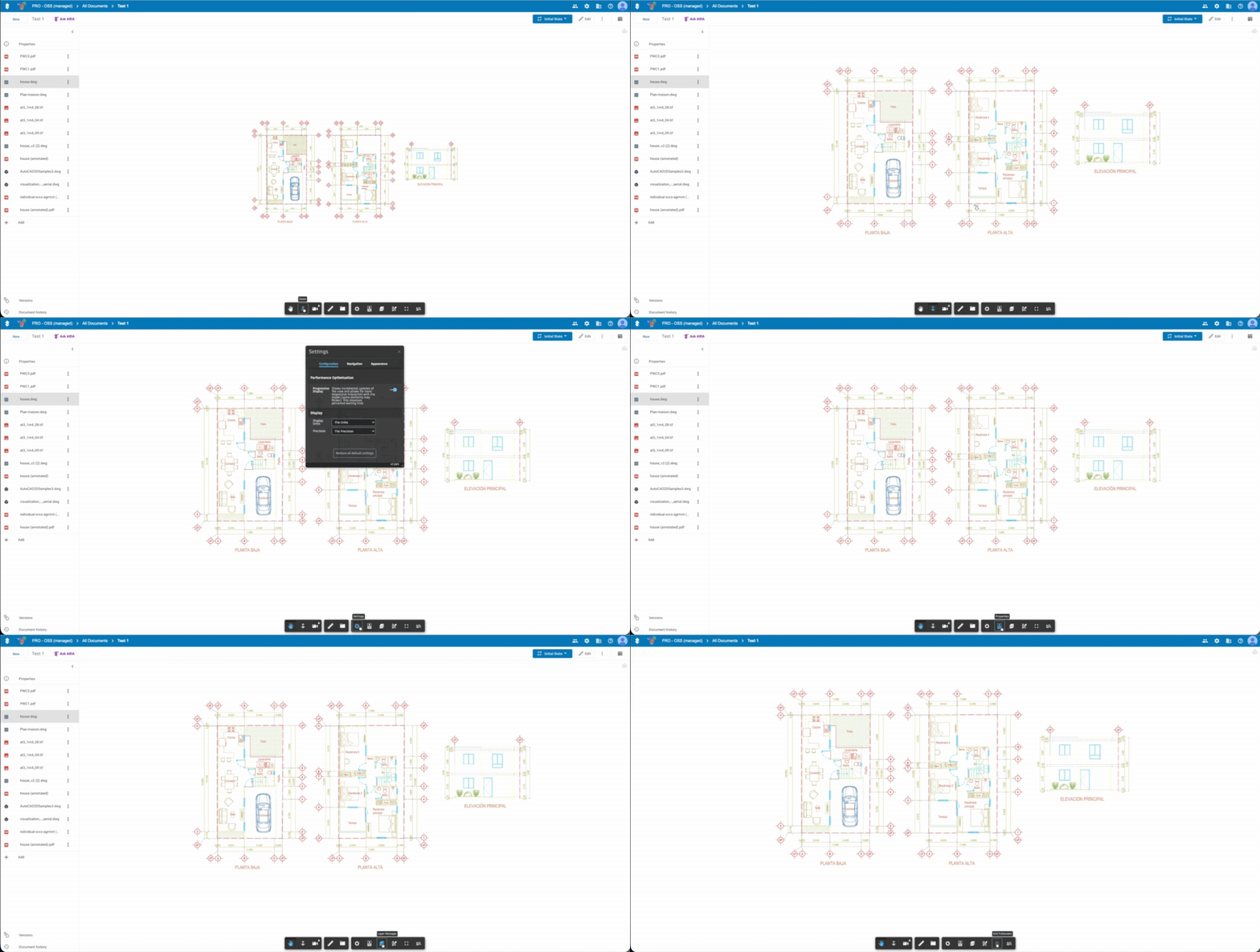
With the Autodesk Viewer, you can:
- Preview over 100 file formats including DWG, RVT, STEP, SolidWorks, CATIA, and Siemens NX
- Rotate, zoom, measure, and navigate inside 3D models directly from the document page
- Review design files in context without switching applications or downloading large files
Availability: This feature requires an Autodesk Forge API integration and licensing. To enable the Autodesk Viewer on your tenant, contact your Sales representative or the AODocs Support team at support@aodocs.com.
Links & Documentation:
• View and annotate attached files
• Configure the Autodesk Viewer integration for your tenant (for Tenant Administrators)
Drawing Comparison: Identify Changes Between Revisions
Select any two versions of a drawing, or two separate documents, and let AODocs surface every change instantly. Added, removed, and modified elements are highlighted directly on the drawing, in overlay or side-by-side view.
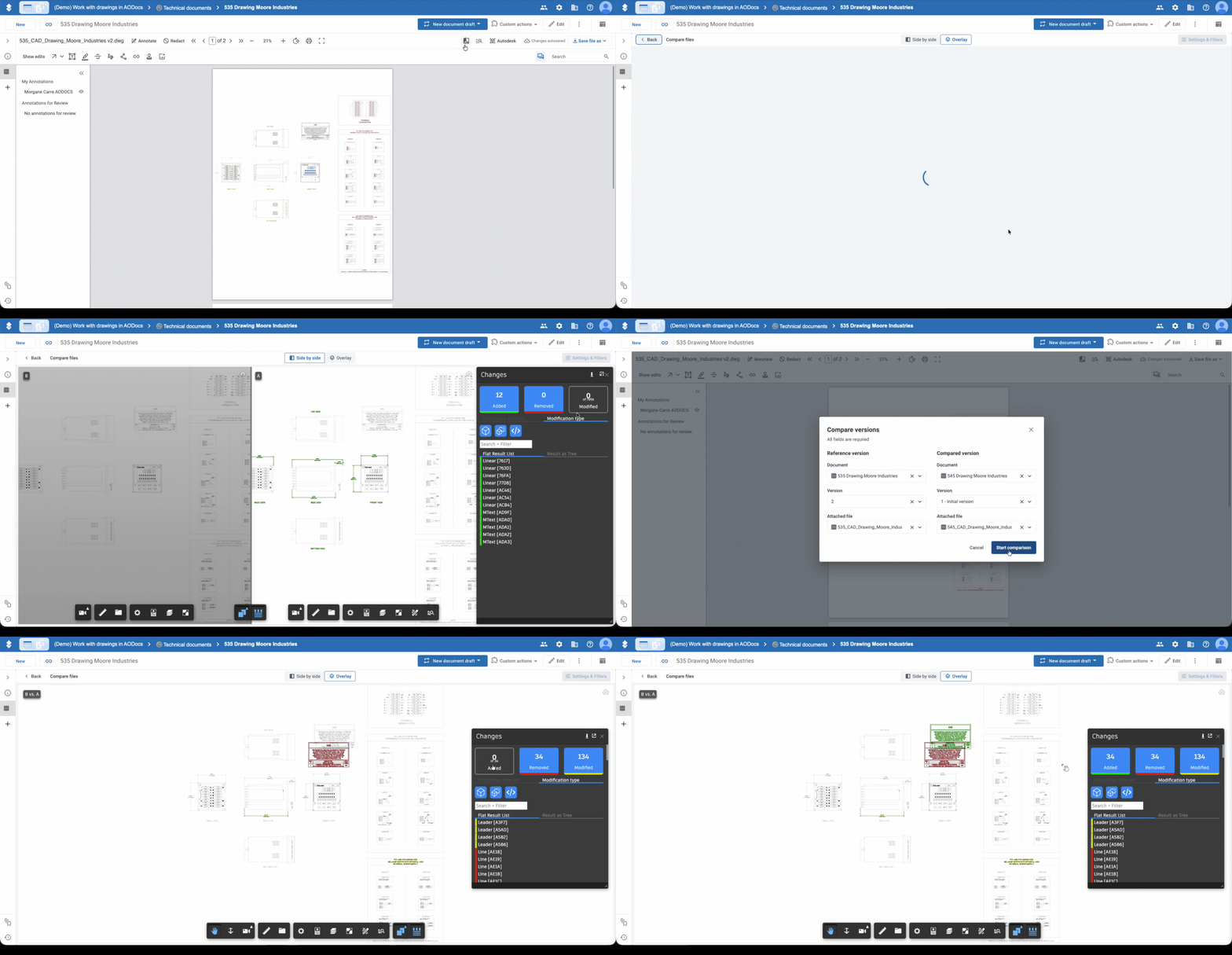
With Drawing Comparison, you can:
- Compare any two document versions or two separate drawings directly from the viewer.
- Visualize changes in Overlay mode or review both versions simultaneously in Side by Side mode.
- Filter and navigate through added, removed, and modified elements via a dedicated Changes panel.
- Support flat formats (PDF, TIFF) and all CAD formats supported by the Autodesk Viewer, including DWG.
Availability: Available out-of-the-box for environments where the Advanced Viewer or Autodesk Viewer is activated.
Links & Documentation:
• Compare drawings and attached files
Annotation & Comment Management: Streamline and Secure Your Contractor Review Cycle
Every annotation made on a drawing is now part of a structured, traceable flow. From the first redline to the contractor's final response, everything happens inside AODocs: one place for every comment, every response, every decision.
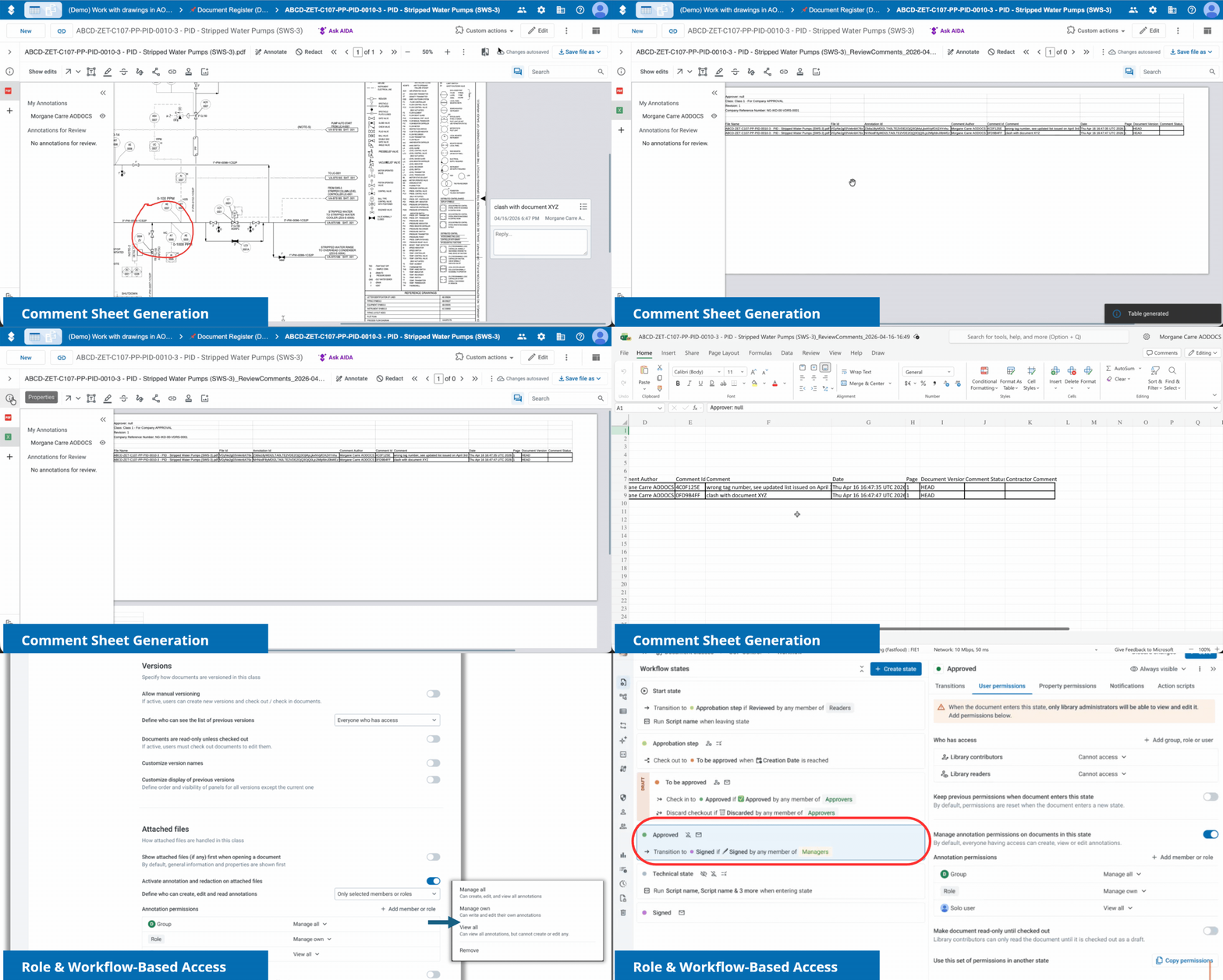
With Annotation & Comment Management, you can:
- Automatically capture all annotations and comments into a centralized table property, turning visual markups into structured, queryable data.
- Export the comment table as an Excel sheet to share with contractors or external stakeholders who don't have platform access.
- Automatically reconcile contractor responses back into the document table when the filled sheet is re-uploaded, with alerts for missing comments or statuses.
- Configure annotation access rules by role and workflow state, so sensitive comments stay visible only to the right people at the right stage.
- Select exactly which annotations to include when burning a PDF, keeping internal comments private while sharing only what's relevant externally.
Availability: Available in views and on the document page when using advanced annotation features. Role-based restrictions are configured by Library Administrators in the Document Class settings.
Links & Documentation:
• Annotate and redact attached files (add instructions on comment tables, exporting sheets, and burning options)
• Manage contractor reviews using comment sheet exports and reconciliation
• Configure role-based annotation restrictions (for Library Administrators)
XREF Management: External References in DWG Files, Handled Automatically
AODocs now manages external references (XREF) in DWG files. Configure your shared assets once at the template level and they are linked automatically to every new DWG created in that library.
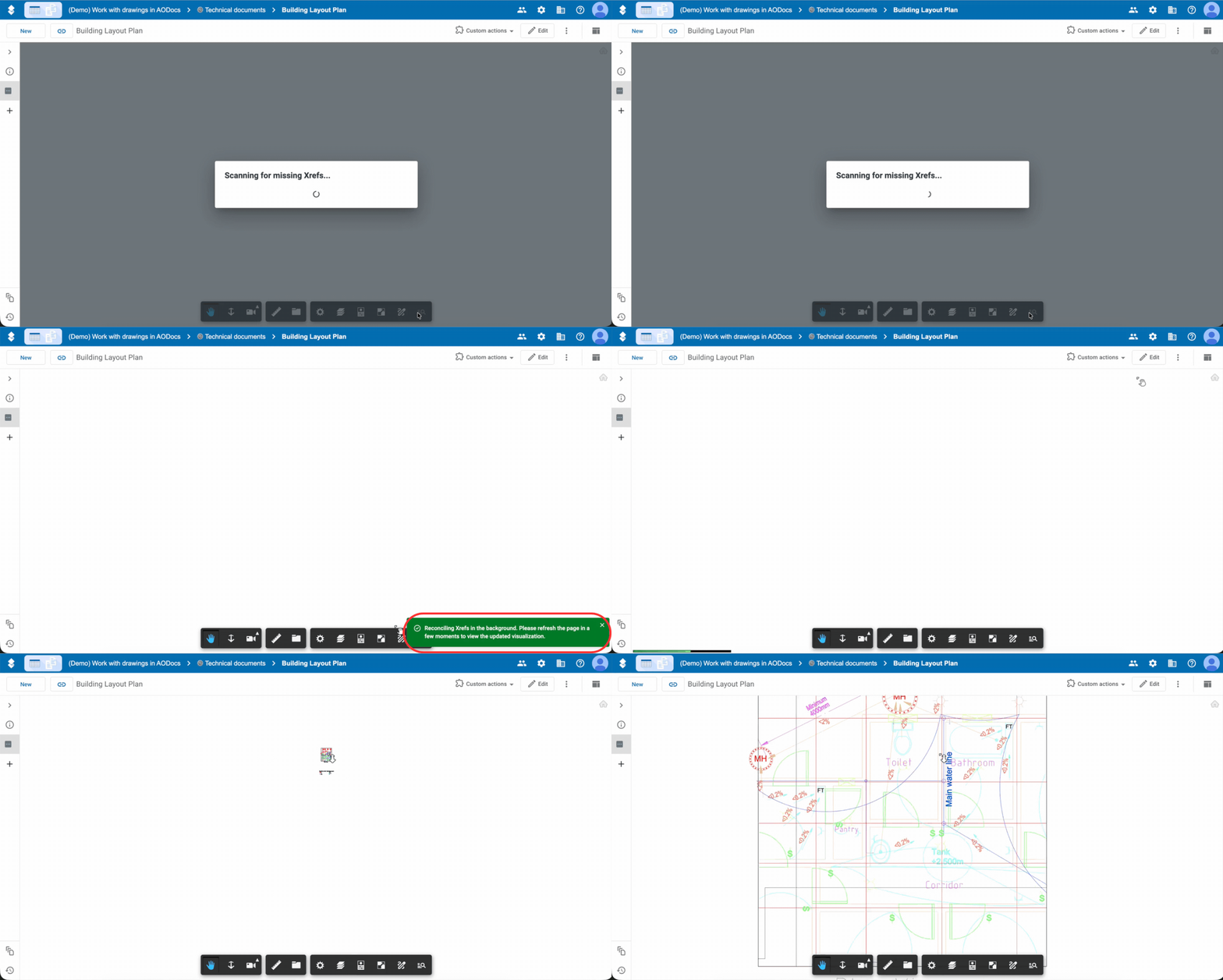
With XREF Management, you can:
- Define default related documents per template, configured once by the admin.
- Have XREF assets linked automatically whenever a new DWG is created in that library.
- Eliminate broken XREF links and the need for manual linking on every new document.
Availability: Library Administrators configure XREF links within Document Class templates in the library administration.
Links & Documentation:
• Manage DWG External References (XREFs) in AODocs templates
Intelligent Automation & Process Improvements
AI-Powered Document Split
With release 69, AODocs Intelligent Document Processing introduces intelligent document splitting for attached files. This enhancement eliminates the need for separator pages and legacy OCR-based tools, bringing scalable, automated batch processing directly into AODocs.
With AI Split, you can:
- Automatically split batch files containing up to 4000 pages.
- Detect document boundaries and classify component documents automatically.
- Route split documents to the appropriate document classes.
Setup is fast and effortless: AODocs automatically generates the required classes, workflows, views, and roles. A built-in validation interface allows users to review low-confidence splits and adjust boundaries before finalizing.
The example below shows three simple configurations where different document types are split and dispatched to different document classes.
Availability: Subject to an AODocs AI license. The Support team will activate AI Split on your tenant. Contact sales@aodocs.com or support@aodocs.com.
Links & Documentation:
• AI for AODocs: Set up AODocs Intelligent Document Processing in your library
• Split batch files using AI-powered document splitting
Calendar Management: Accurate Deadlines for Global Project Teams
Project teams working across multiple countries can now configure working calendars per library. Due date calculations automatically account for local public holidays and non-working days.
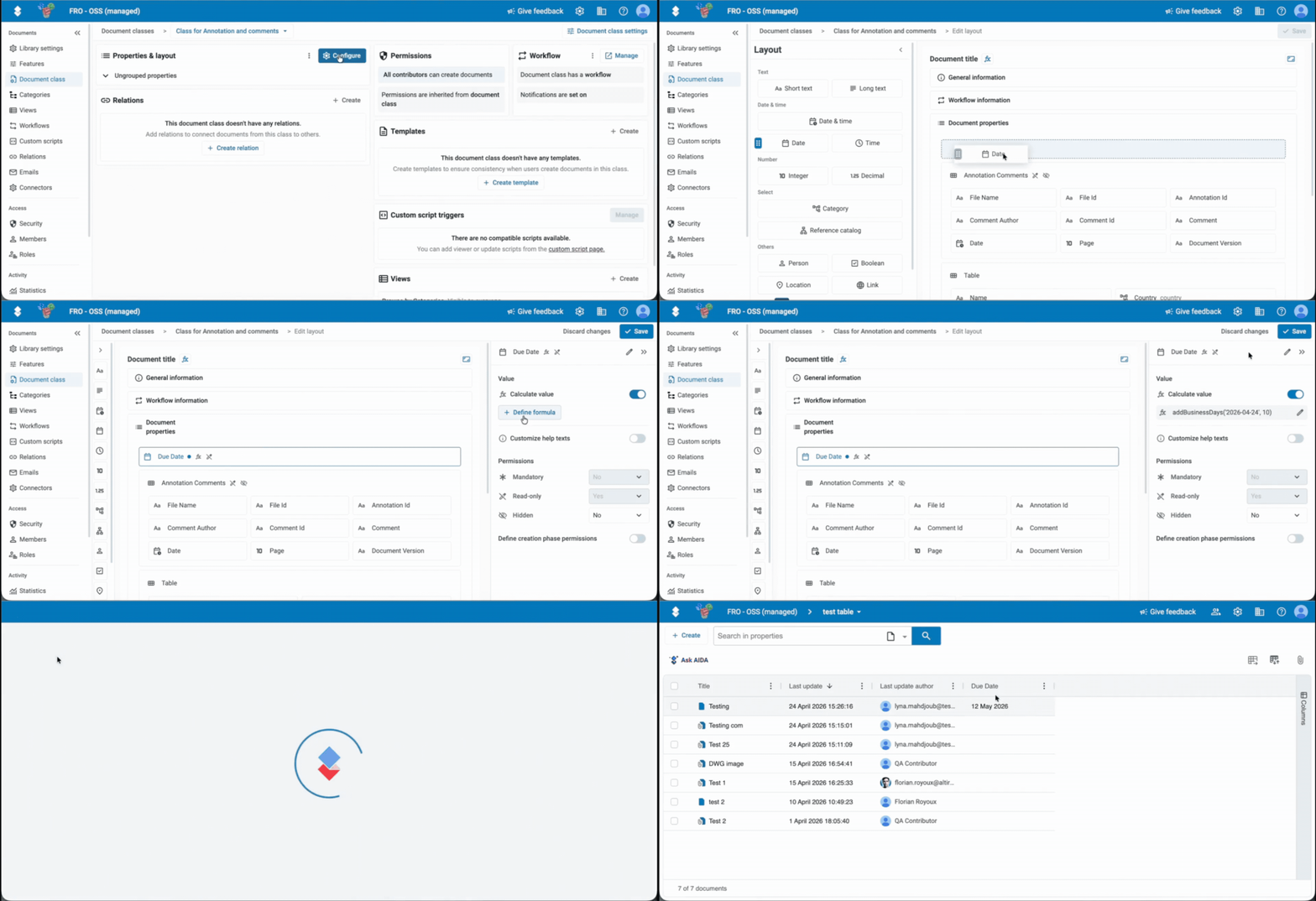
With Calendar Management, you can:
- Define working days and non-working days per library, with local public holidays by country.
- Calculate due dates using business day logic, automatically adjusted for the library's calendar.
- Apply different calendars across libraries, covering multi-country project portfolios.
Availability: Super Administrators manage domain-level calendars. Library Administrators can select a default calendar and configure calculated properties using business days.
Links & Documentation:
• Manage domain-level calendars and holidays (for Tenant Administrators)
• Assign calendars and configure business day calculations in your library (for Library Administrators)
• Use formulas in AODocs
Interface & Usability Enhancements
New Views Active by Default
With AODocs release 69, new views will be active by default in all libraries on all customer domains. The new views are faster loading and offer several new features, including the ability to edit properties and access the document preview.
Key Features:
- Faster load times: Significant speed improvements when browsing large lists.
- Inline property editing: Edit document properties directly within the view without opening the document page.
- Column-level filtering: Filter grid tables individually per column.
- Flexible options: You can still opt out of new views at the library or tenant level if you want to introduce the changes at your own pace.
Availability: Enabled automatically. Opt-out toggles are available under Tenant Settings and Library Settings.
Links & Documentation:
• Use new views in your AODocs libraries
• Activate or deactivate early-access features in libraries
Document Preview (Side Panel in New Views)
The new document preview – available in the side panel of new views – lets users view and interact with documents instantly, without navigating out of the view. By reducing context switching, the document preview significantly improves productivity and user efficiency.
You can:
- Preview documents in one click in the view.
- Instantly view a document’s properties, attached files, workflow state, and related items.
- Perform workflow transitions, run custom actions, and open related items.
- Navigate seamlessly between documents using keyboard arrows.
Availability: Active by default in all libraries across your tenant. Library administrators can head to the new library administration to configure tabs, control allowed actions, or deactivate the feature.
Links & Documentation:
• Use new views in your AODocs libraries (Document Preview)
• Configure views in the new library administration (Define how users can interact with the view) (for Library Administrators)
Display Messages for Users Directly in the AODocs Interface
A brand new feature lets AODocs super administrators display messages directly in AODocs, to ensure users receive critical information at the right time. You can choose to display:
-
A persistent banner at the top of the screen
-
A confirmation dialog, which users must confirm
Availability: Available by request on customer tenants. Super Administrators configure messages in the Tenant Administration interface.
Links & Documentation:
• Set up Banner and Dialog Messaging
* * *
Enterprise Governance & Integrations
SharePoint Embedded
AODocs is expanding its Microsoft 365 integration with integration into Microsoft SharePoint Embedded. This integration combines Microsoft-native storage with AODocs enterprise governance. Documents are stored directly within your M365 tenant in dedicated containers, while AODocs delivers metadata management, workflows, permissions, and enterprise control on top.
With SharePoint Embedded, you get:
- Dedicated storage within your Microsoft 365 tenant, isolated from SharePoint quotas.
- Full access to Microsoft 365 services such as Copilot, Purview, co-authoring, and advanced security tools.
- AODocs governance layered onto Microsoft-native storage.
When you create a library you’ll be able to select SharePoint Embedded as a storage platform for your AODocs attached files.
Availability: Contact your sales representative or send an email to sales@aodocs.com if you are interested in using SharePoint Embedded as your AODocs storage platform.
Links & Documentation:
• Understand and set up Microsoft SharePoint Embedded storage in AODocs
Workflow Task Delegation
The new workflow task delegation feature ensures that critical tasks never stall, by letting users redirect their responsibilities to a colleague (when on vacation for example).
Workflow Task Delegation includes:
- Flexible setup: users can create delegations for themselves; super administrators can set them up for others.
- Time-bound control: set exact start and end dates to ensure work is only redirected for the specific period needed.
- Real-time visibility: access a dedicated My Delegations panel to track your active redirects and the tasks you are currently covering for others.
- Full accountability: every action performed via delegation is clearly labeled, ensuring complete traceability in the document history and workflow side panel.
- Built-in safeguards: delegations can’t be chained or looped (if A delegates to B, B can’t pass those tasks on to C) – responsibilities always stay one explicit, auditable step from their owner.
Availability: To activate Workflow task delegation on your domain, contact the Support team by email at support@aodocs.com or open a ticket.
Links & Documentation:
• Delegate your workflow tasks (for End Users)
• Manage workflow task delegation on your AODocs tenant (for Administrators)
Other Improvements
- Annotations on GCS & Azure storage: The Annotation and redaction feature is now available in all libraries, including those using Google Cloud and Azure Blob Storage.
- Azure Active Directory (AD) synchronization: AODocs is now fully synchronized with MS Azure Active Directory (AD). When users are added, edited, or removed within Azure AD, the changes are automatically propagated to AODocs.
- Compact email notifications: Table properties rendered in workflow email notifications are now formatted as compact HTML tables with built-in safeguards to truncate overflow, keeping emails clean and readable.
- Google Drive Limited Access sync: Automatic synchronization of Google Drive's Limited Access flag in Secured and Team Folder libraries ensures permissions and inherited visibility stay aligned between AODocs and Google Drive.
- Google Group Membership force-refresh: Domain Super Admins can force-refresh the Google Group membership cache via a public API to propagate permission changes faster.
And there’s more coming soon…
Property Lookups
We’ll soon introduce Property Lookups, a powerful feature that automatically syncs property values across linked documents. Eliminate manual updates, reduce errors, and maintain data consistency at scale, without using any custom script.
Would you like to meet our product team to discuss your needs? Join the AODocs research group!