What is the Forms to AODocs add-on?

Forms to AODocs is an add-on for Google Forms. It lets you create content quickly in AODocs. It's as easy as filling out a Google Form and submitting it.


How does the Forms to AODocs add-on work?

The Forms to AODocs add-on links a Google form and an AODocs library.

When someone fills in and submits the Google form, an AODocs document is created in the library. The document's properties contain their answers. Any files uploaded to the form will become attached files in the AODocs document.
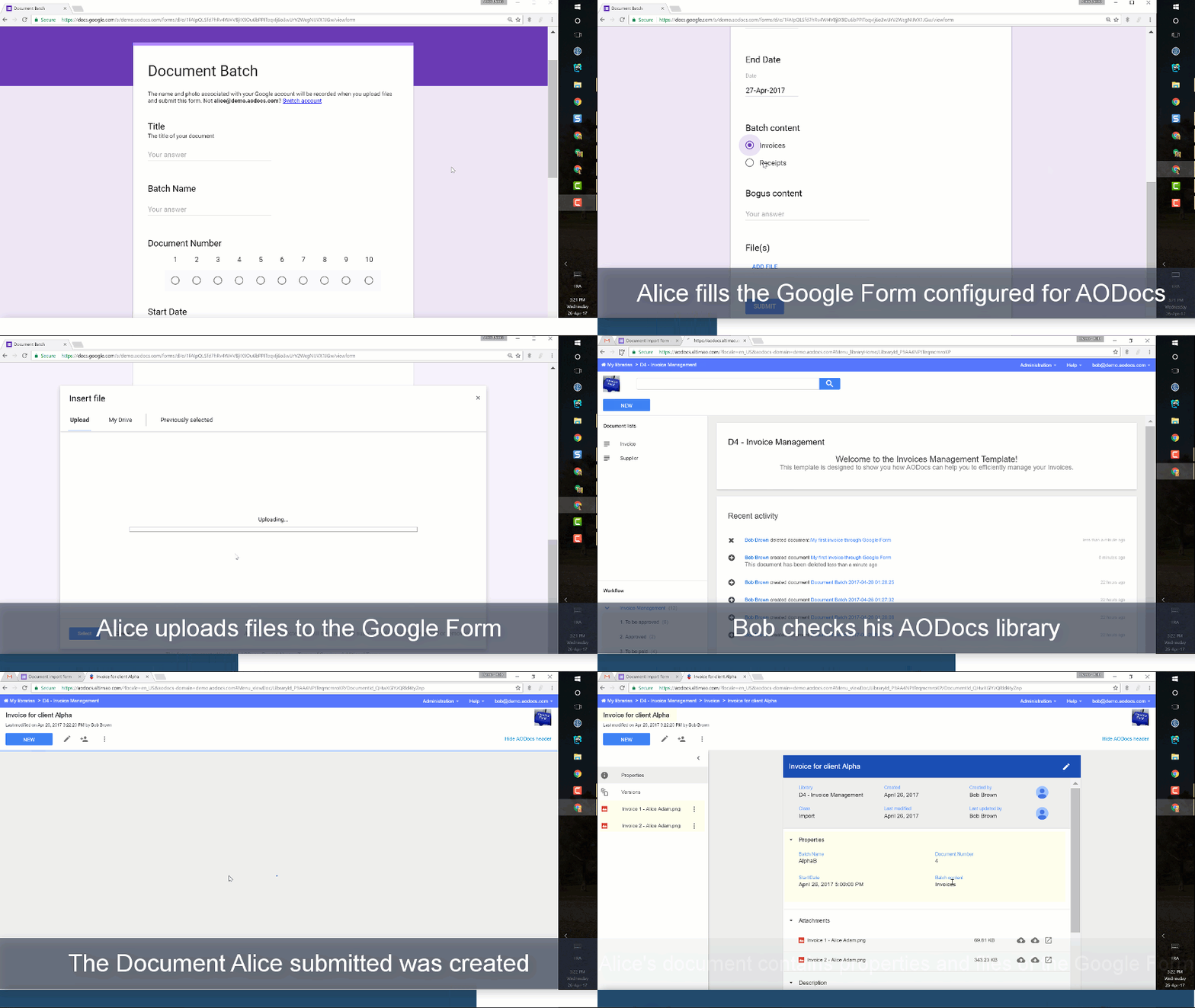
Forms_to_AODocs.gif

Important:
– To associate a form with an AODocs library using the add-on, you must be an administrator of the library.
– The Forms to AODocs add-on is compatible with all types of library.


Ready to get started?

Learn more: Install the Forms to AODocs add-on.

Was this article helpful? 2 out of 5 found this helpful
If you didn’t find what you were looking for, don’t hesitate to leave a comment!
Have more questions? Submit a request

Comments

11 comments
  • Is this only for forms creation ? . What if user wants to change their entry. Is this possible to access previously created AOC document via Google form?

    0
    Comment actions Permalink
  • Hello Adam,
    Previously created AODocs document have to be updated via the AODocs interface, you can only create documents using the Google Forms to AODocs connector.

    0
    Comment actions Permalink
  • Could this form be completed by external users?

    0
    Comment actions Permalink
  • Hi Nieves,
    Yes, that's correct. You just need to make the form available to external users.
    Have a good day!

    0
    Comment actions Permalink
  • Can I manually map fields between Google Forms and document properties in the add-on?

    For example, I have a document property called "Responsible's Email," but in the Google Form, the corresponding field is labeled "Email del responsable / Responsible's email." Since the add-on doesn’t recognize the field due to the difference in naming, I need a way to manually map the Google Form field to the document property.

    1
    Comment actions Permalink
  • Hi Hernan,
    Thanks for your question. Currently, the title of a question must be the same as the name of the corresponding AODocs property. You can find information about mapping in this article: https://support.aodocs.com/hc/en-us/articles/115002210966-Configure-your-Google-form-and-preview-your-mappings
    Feel free to make a feature request and others can then vote for it: https://support.aodocs.com/hc/en-us/community/topics/200132124-AODocs-Feature-Requests
    Have a good day!

    0
    Comment actions Permalink
  • Can we change, update, or delete documents using these forms? This is essentially the same question Adam asked some years ago, but I wanted to follow up now that some time has passed. Thank you.

    0
    Comment actions Permalink
  • Hi Filipe,
    Thanks for your question. This hasn't changed. You can only create documents using the Google Forms to AODocs connector. You can't update them.
    Feel free to make a feature request and others can then vote for it: https://support.aodocs.com/hc/en-us/community/topics/200132124-AODocs-Feature-Requests
    Have a good day!

    0
    Comment actions Permalink
  • Hello Catherine,

    Do you recommend any particular way of doing this? I just want to make sure we’re not overlooking anything that could help us. Thanks!

    0
    Comment actions Permalink
  • Hi Filipe,
    There's no way of editing documents using the Forms to AODocs addon. You'd have to edit documents manually from the AODocs interface.
    Sorry I can't be of more help.

    1
    Comment actions Permalink
  • Thanks a lot.

    0
    Comment actions Permalink

Please sign in to leave a comment.